Generate PDFs from Google Sheets
There's no PDFMonkey add-on for Google Sheets. You connect your spreadsheet through Zapier, Make or n8n instead, or through Glide if you've built an app on top of it.
From a row to a document
There’s no PDFMonkey add-on inside Google Sheets. Instead, you go through one of our official integrations with Zapier, Make or n8n, which can all watch a spreadsheet for you. If you’ve built an app on top of your sheet with Glide, PDFMonkey is already available in there.
Plenty of things live in a Google Sheets file: a list of participants, an order log, a price list, a client tracker. When a new row shows up, you can turn it into a proper document with your branding rather than printing the sheet. Most people start with certificates (one per participant) or invoices and quotes (one per order). A report can also take a whole range of rows and lay them out as a table. And labels or badges, one per row, are ready to print. If your template’s output type is Image, you get WebP, PNG or JPG files instead.
With Zapier, Make or n8n
- Design your template in PDFMonkey, with the visual Builder or in code. Name the variables after your column headers and publish it.
- In your automation tool, start from a Google Sheets trigger, such as a new or updated row.
- Add the PDFMonkey Generate Document step and map your columns to your template variables. To get a table in the document, send several rows as a list and let the template loop over them.
- Then do something with the file: email it, save it to Google Drive, or write the Drive link back into your sheet.
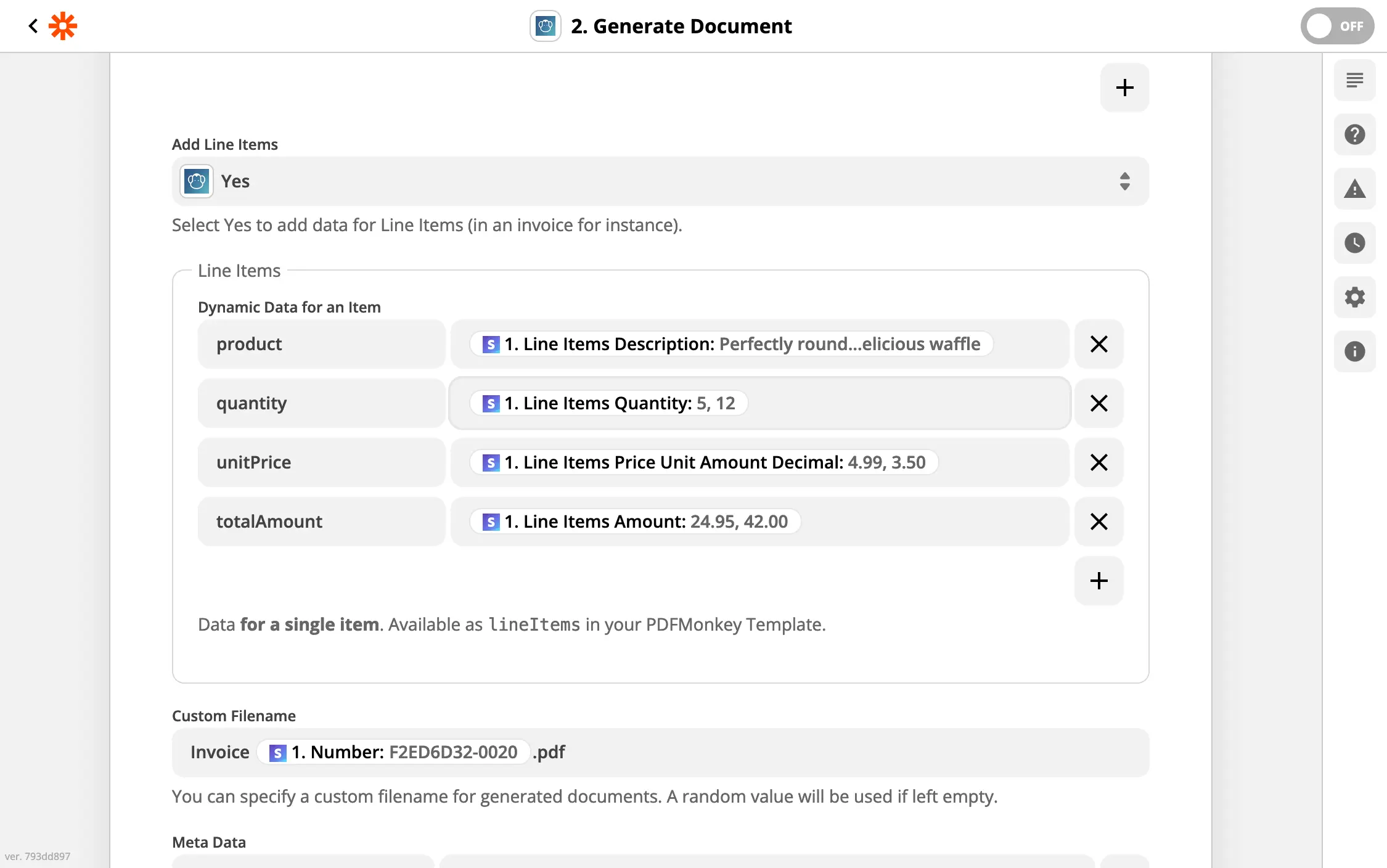
Here in Zapier: each line item field becomes a column of the table in your document.
Keep it all in the same run. PDFMonkey download links expire after one hour, which is why we recommend saving the file to Drive rather than pasting our link into the sheet.
Each guide walks you through the setup: Zapier, Make and n8n. The n8n one has an example that turns Google Sheets rows into a table in your document.
If your app runs on Glide
Glide builds an app out of a spreadsheet, and it comes with a native PDFMonkey integration. You add PDFMonkey from your app’s settings, then use the Generate PDF file action on a button, a form or a workflow. The download link ends up in a column of your data. We have a page about Glide, and the Glide guide has the details.
If you’re a developer, you can also leave the automation tools aside and call the PDFMonkey API yourself.
To give it a go, create a free PDFMonkey account and start with a single row. We’re around if you have questions. 😊
FAQ
Is there a PDFMonkey add-on for Google Sheets?
No. You connect Google Sheets to PDFMonkey through our official integrations for Zapier, Make or n8n, which all have Google Sheets triggers. If you’ve built an app on top of your sheet with Glide, Glide has a native PDFMonkey action. Developers can also call the PDFMonkey REST API directly.
Can I generate one PDF per row?
Yes. Your automation runs once per new row, and each run creates its own document. For rows that are already in the sheet, Make and n8n can loop over them in a single run.
Can I put a whole table from my sheet into one PDF?
Yes. Send the rows as a list and have the template loop over them to build the table. Both Code and Builder templates support loops. In Zapier, use line items; in Make or n8n, send a JSON array.
Is there a free plan?
Yes. The Free plan includes 20 documents per month, forever, with no credit card required. Every new account also starts with a 30-day trial that includes 300 documents. Paid plans start at €5 per month with Starter (300 documents per month).
Do I need to know HTML to design my template?
No. When you create a template, you pick one of two modes: the visual drag-and-drop Builder, or a Code template written in HTML, CSS and Liquid. A template uses one mode or the other, never both. Your spreadsheet data is sent the same way in both cases.
Where is my data hosted?
In the European Union. PDFMonkey’s application servers, file storage and rendering engines run in Paris, France, and its database runs in Frankfurt, Germany. A GDPR Data Processing Agreement is available.
Other no-code integrations
PDFMonkey also works with Zapier, Make, n8n, Bubble and Glide. If your data lives in a database instead, have a look at Airtable.
Make PDF easy for yourself.
Start using PDFMonkey for free today.
No credit card required. No strings attached.