Generate PDFs from Airtable
There's no PDFMonkey app inside Airtable. Your records can still become PDFs, though: through Zapier, Make or n8n, or with a short Airtable automation script.
No extension, two ways around it
You won’t find a PDFMonkey extension inside Airtable. We’d rather say it here than have you hunt for it. What we do have are official integrations with Zapier, Make and n8n, the tools most Airtable bases are already plugged into. And if a bit of JavaScript doesn’t scare you, an Airtable automation script can call our API directly.
A lot of teams run their orders, clients, events or trainings in Airtable. At some point a record reaches a stage, like “Won” or “To invoice”, and somebody has to produce a document from it. Usually that means copy-pasting into a word processor, and that’s the part you can hand over to PDFMonkey: an invoice or quote, a certificate for every attendee, a client report pulling in linked records, a delivery note per order. Images work too (WebP, PNG or JPG), if your template uses the Image output type.
With Zapier, Make or n8n
- Design your template in PDFMonkey, with the visual Builder or in code. Name the variables after your Airtable fields, it makes mapping easier later. Publish it.
- In your automation tool, start from an Airtable trigger, for instance a new or updated record.
- Add the PDFMonkey Generate Document step and map your Airtable fields to your template variables. Line items, like the rows of an invoice, can be sent as a list.
- Then send the file where it belongs: back into the record as an attachment, to your client by email, or into storage.
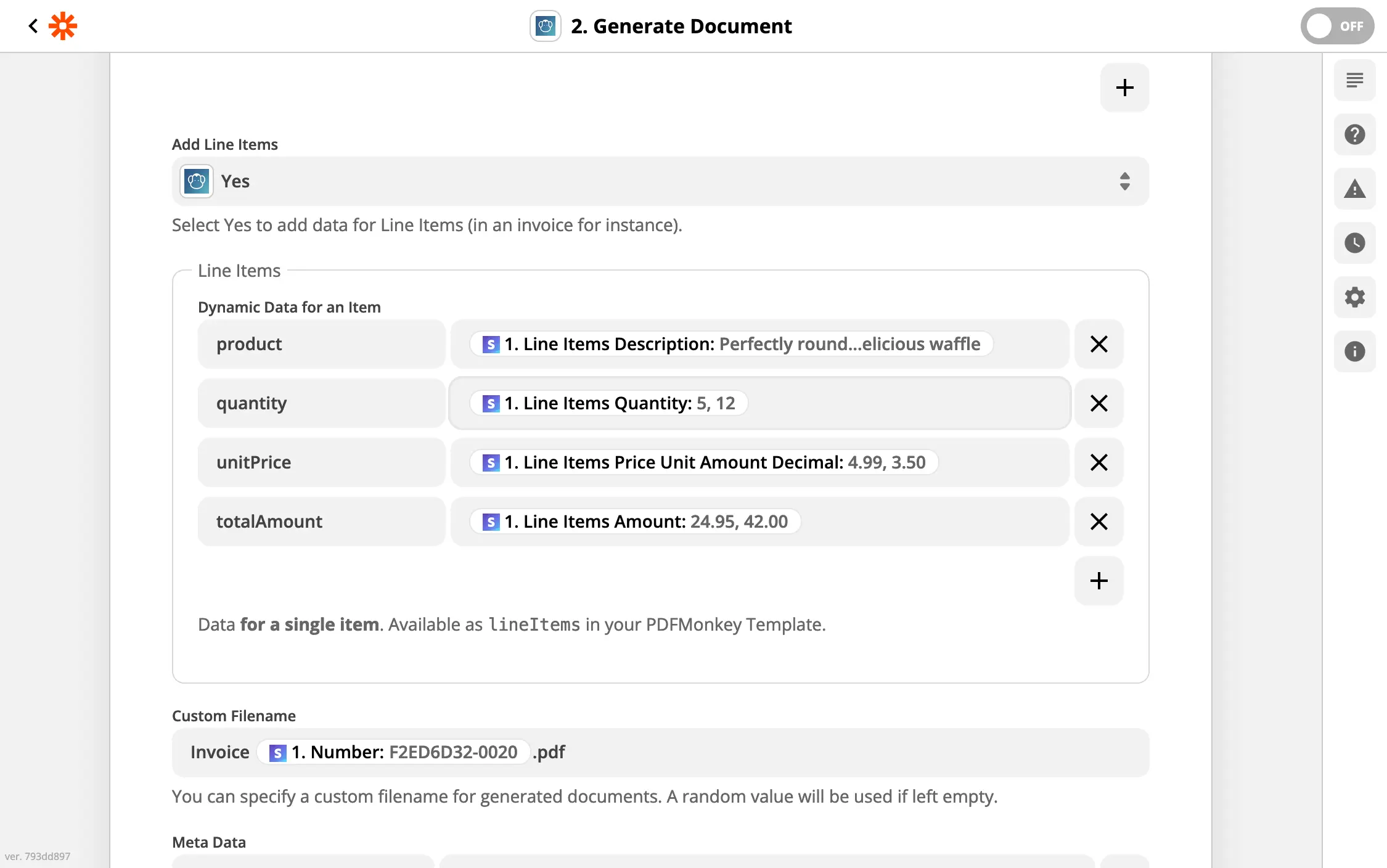
Here in Zapier: each line item field becomes a column of the table in your document.
Do step 4 in the same run. PDFMonkey download links expire after one hour, so a link saved for later won’t work.
Our guides go through the setup step by step: Zapier, Make and n8n.
With an Airtable automation script
If your Airtable plan includes automation scripts, a Run a script action can call the PDFMonkey API with fetch(). Store your PDFMonkey API key as an Airtable secret, add the record ID as an input variable, and adapt the table, field and template names below:
// Airtable automation → "Run a script" action
// Input variable: recordId — Secret: PDFMONKEY_API_KEY
const { recordId } = input.config();
const table = base.getTable('Invoices');
const record = await table.selectRecordAsync(recordId);

const response = await fetch('https://api.pdfmonkey.io/api/v1/documents/sync', {
  method: 'POST',
  headers: {
    'Authorization': `Bearer ${input.secret('PDFMONKEY_API_KEY')}`,
    'Content-Type': 'application/json',
  },
  body: JSON.stringify({
    document: {
      document_template_id: 'YOUR_TEMPLATE_ID',
      status: 'pending',
      payload: {
        customerName: record.getCellValueAsString('Customer'),
        total: record.getCellValue('Total'),
      },
      meta: { _filename: `Invoice ${record.getCellValueAsString('Number')}.pdf` },
    },
  }),
});

const body = await response.json();
// Wrong API key, unpublished template…: the API returns errors, not a document
if (!response.ok) {
  throw new Error(JSON.stringify(body.errors ?? body));
}

const { document_card } = body;
if (document_card.status !== 'success') {
  throw new Error(document_card.failure_cause);
}

// Airtable downloads the file and keeps its own copy
await table.updateRecordAsync(recordId, {
  PDF: [{ url: document_card.download_url, filename: document_card.filename }],
});
We used the /sync endpoint here because it waits for the document and returns it in a single request, which keeps the script short. Airtable scripts have an execution time limit, though. If your documents are heavy, create them with the regular asynchronous endpoint instead and let a webhook tell you when they’re ready.
Whichever route you take, you can create a free PDFMonkey account and try it on one record first. And if your base has a setup we didn’t think of, tell us about it!
FAQ
Does PDFMonkey have a native Airtable integration?
No, there is no PDFMonkey extension inside Airtable. You connect the two through our official integrations for Zapier, Make or n8n, which all have Airtable triggers, or with an Airtable automation script that calls the PDFMonkey REST API.
Can I attach the generated PDF back to the Airtable record?
Yes. Write the download URL into an attachment field in the same run, and Airtable downloads the file and keeps its own copy. Do it right away: PDFMonkey download URLs expire after one hour.
Should I use Zapier, Make or n8n?
Whichever one you already use. All three have an official PDFMonkey integration and can react to new or updated Airtable records. n8n can also be self-hosted, if that matters to you.
Is there a free plan?
Yes. The Free plan includes 20 documents per month, forever, with no credit card required. Every new account also starts with a 30-day trial that includes 300 documents. Paid plans start at €5 per month with Starter (300 documents per month).
Do I need to know HTML to design my template?
No. When you create a template, you pick one of two modes: the visual drag-and-drop Builder, or a Code template written in HTML, CSS and Liquid. A template uses one mode or the other, never both. Your Airtable data is sent the same way in both cases.
Where is my data hosted?
In the European Union. PDFMonkey’s application servers, file storage and rendering engines run in Paris, France, and its database runs in Frankfurt, Germany. A GDPR Data Processing Agreement is available.
Other no-code integrations
PDFMonkey also works with Zapier, Make, n8n, Bubble and Glide. If your data lives in a spreadsheet instead, have a look at Google Sheets.
Make PDF easy for yourself.
Start using PDFMonkey for free today.
No credit card required. No strings attached.